Stop copy-pasting your AI conversations manually! AI Chat Exporter is a lightweight, privacy-focused tool designed to help you save and organize your AI chats with one click.
Whether you are a developer building a knowledge base, a student organizing study notes, or a writer collecting inspiration, this extension makes exporting effortless.
Works on ChatGPT (chatgpt.com), Claude (claude.ai), and Gemini (gemini.google.com).
The fastest way to move chats. Optimizes clipboard content for Notion, Obsidian, Word, Google Docs, and more.
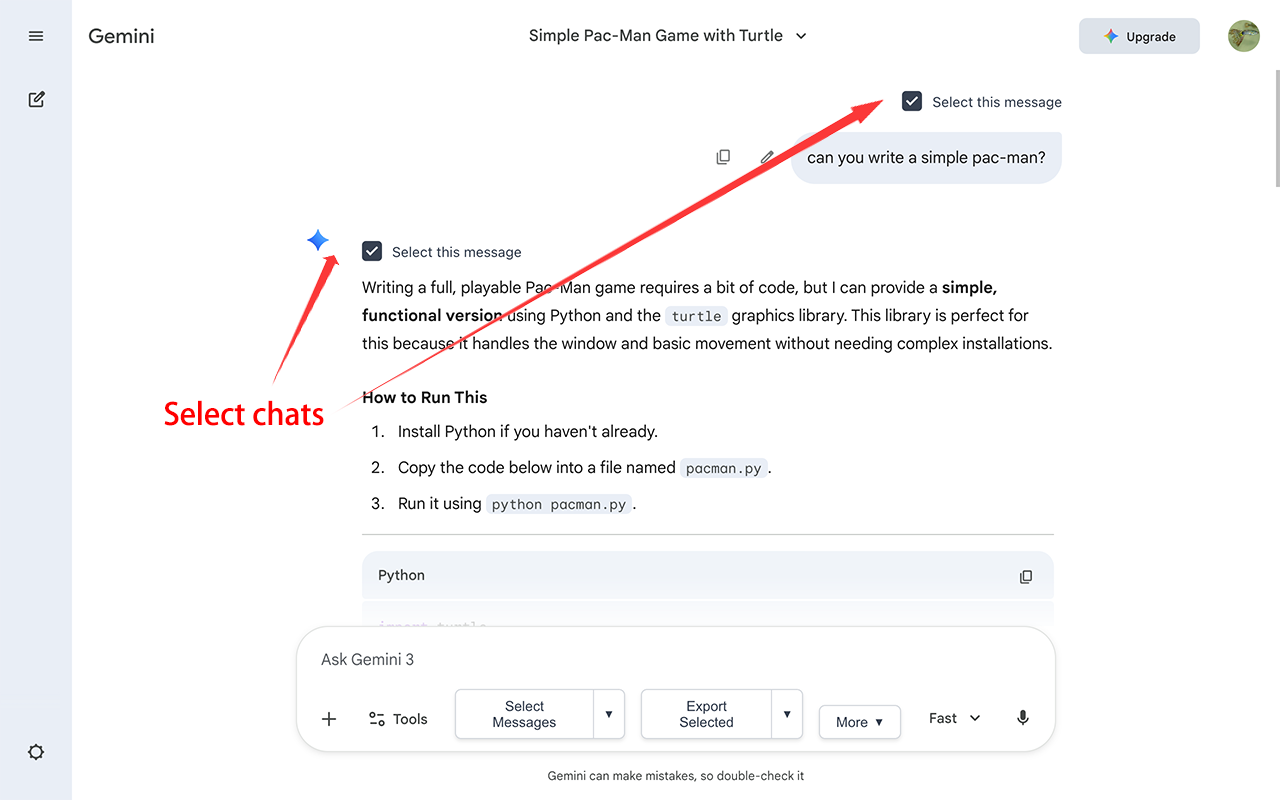
Toggle "Select Mode" to check only specific messages you want to save.
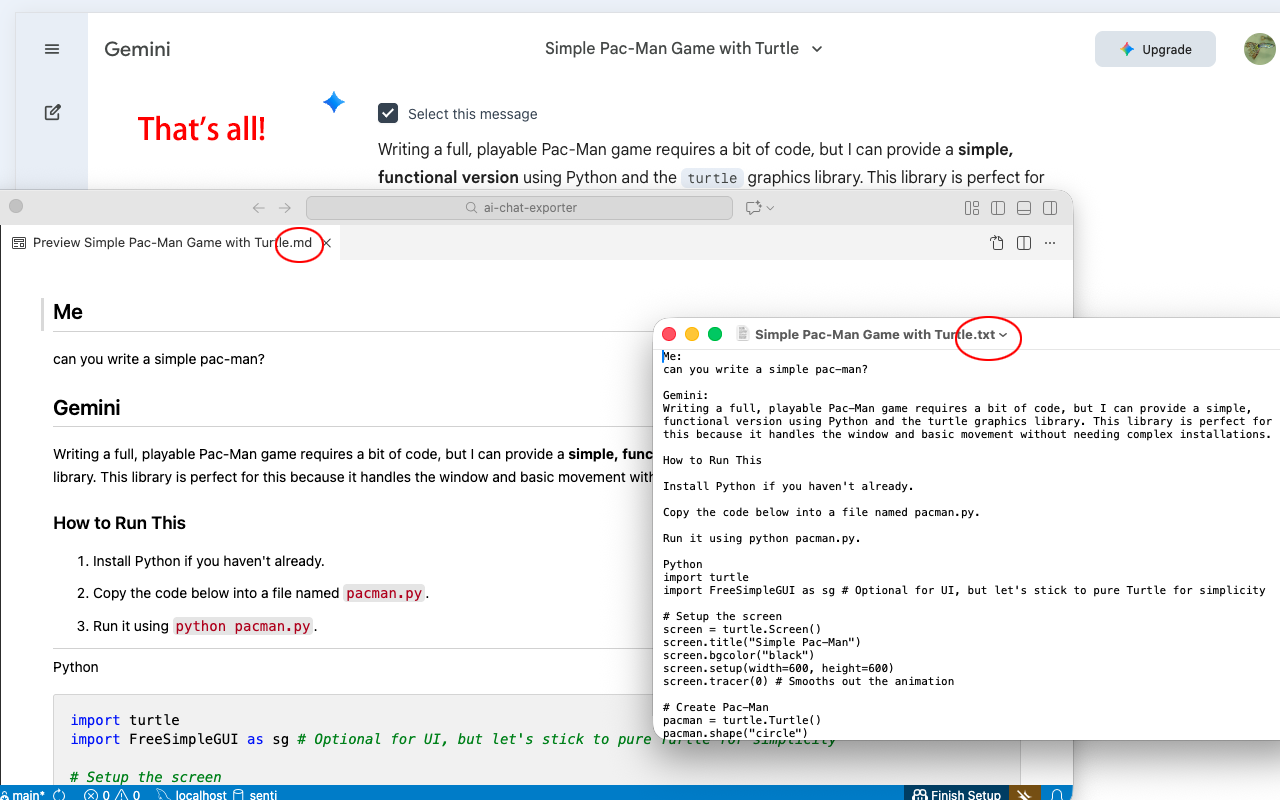
Perfect conversion of code blocks (with language tags), bold text, lists, and tables. Includes clear separators (---) for readability.
Everything happens locally in your browser. We never collect or upload your chat history.
Interface available in English, 中文, 日本語, 한국어, Deutsch, Français, and Español.
Download AI-generated images as a complete offline package. The best way to preserve your visual creativity forever.
One-click to generate a high-quality long image of the conversation. Optimized for sharing on social media.
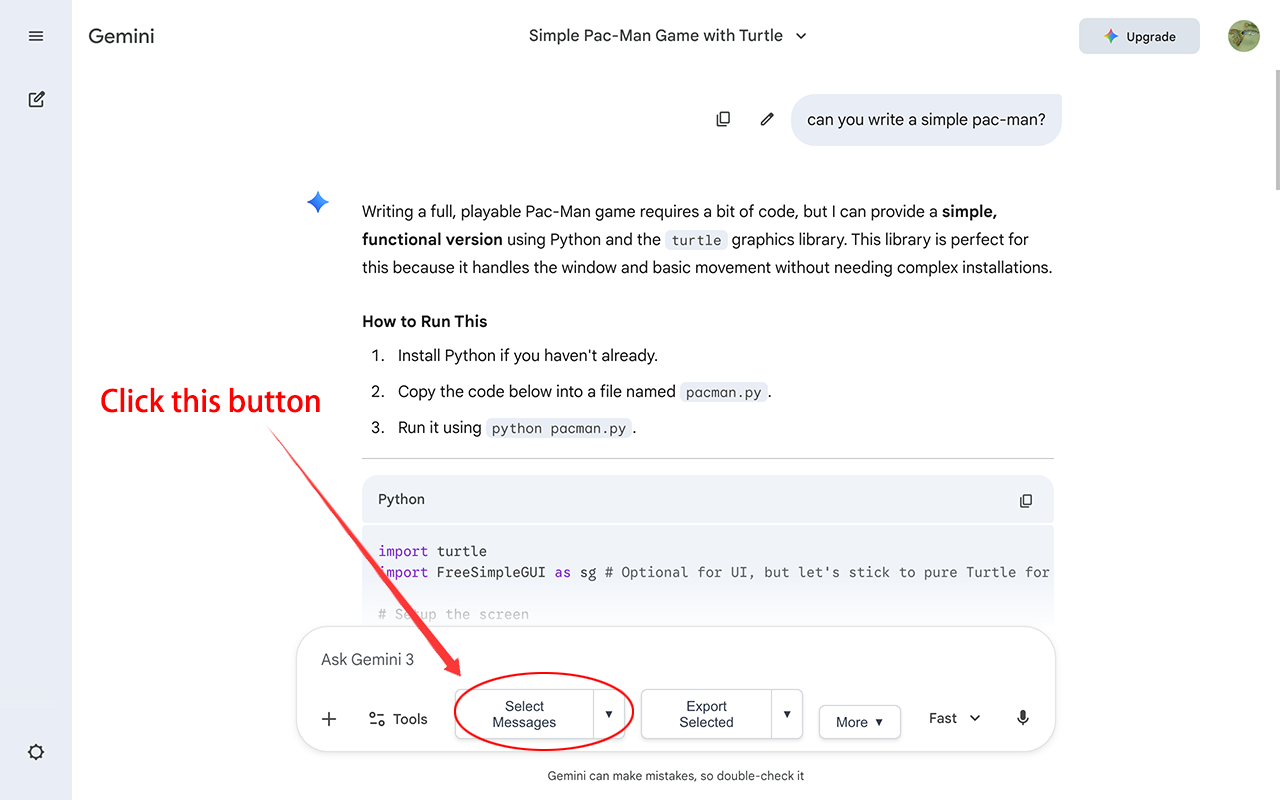
Open any chat on ChatGPT, Claude, or Gemini.
Click the extension icon or the "Select" button on the page.
Choose the messages you want to export.
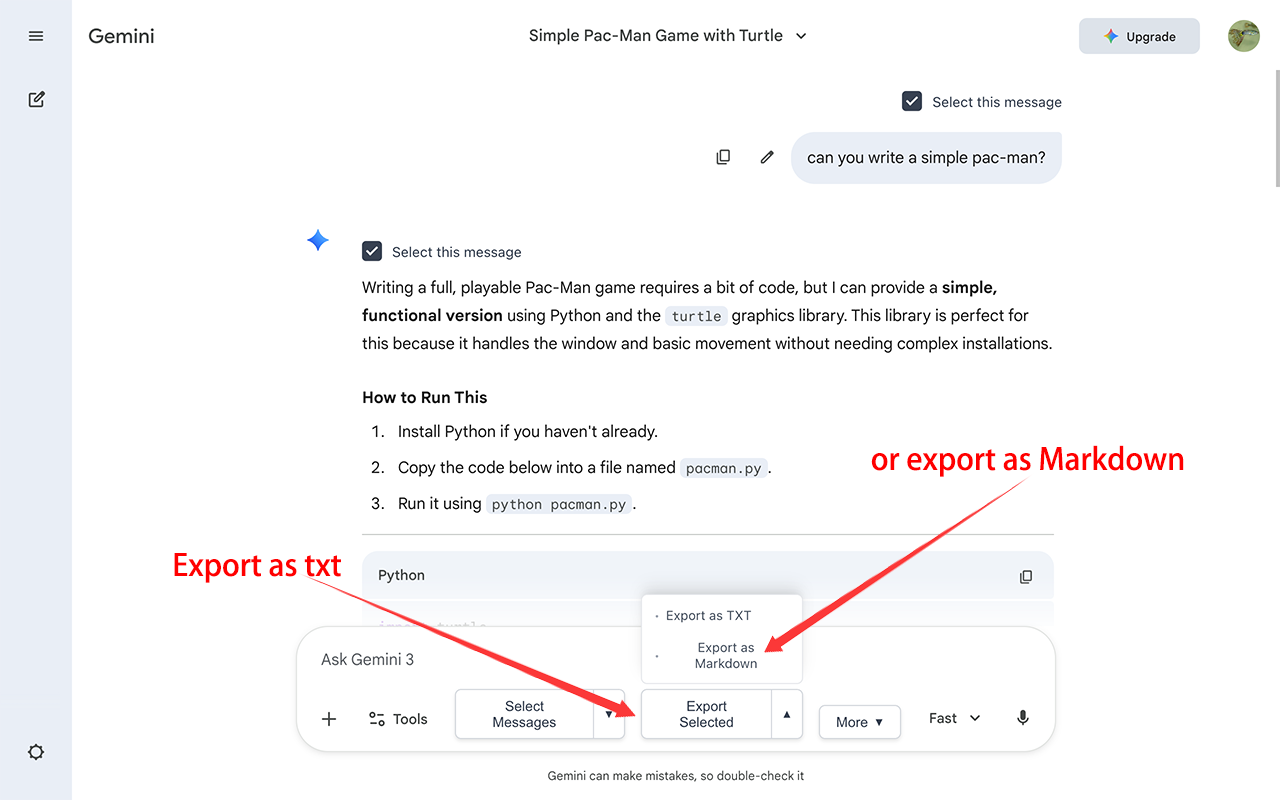
Use "Smart Copy" to paste into Notion/Word, or click "Export" to download files instantly.
Yes, AI Chat Exporter is designed with a privacy-first approach. All processing happens locally in your browser. AI Chat Exporter does not collect, store, or transmit any of your chat history, personal data, or AI conversations to external servers.
This permission is necessary to read the conversation content on chat pages so AI Chat Exporter can export it. AI Chat Exporter only operates on supported AI platforms (like ChatGPT, Claude, Gemini) and does not read other unrelated websites, nor does AI Chat Exporter save or upload any of your data.
AI Chat Exporter currently provides full compatibility for ChatGPT (chatgpt.com), Claude (claude.ai) and Google Gemini (gemini.google.com). We are actively working to include more platforms like DeepSeek and Kimi in future updates.
Yes, AI Chat Exporter is 100% free. We believe there should be no barriers to recording knowledge. There are no hidden fees, no subscriptions, and no limits on how many chats you can export.
Yes, AI Chat Exporter works perfectly on all Chromium-based browsers, including Microsoft Edge, Brave, Arc, and Opera. You can install AI Chat Exporter directly from the Chrome Web Store.
Use 'Export Markdown' if you want to save the conversation as a local file for long-term collection. 'Smart Copy' is better if you want to quickly paste content into Notion, Word, or Obsidian while maintaining perfect formatting.
Yes! Click the 'Select' button on the page to enter selection mode, check the messages you want, and then click export or copy.
Absolutely. AI Chat Exporter is optimized for knowledge management tools. When you export to Markdown or use 'Smart Copy', AI Chat Exporter ensures that code blocks, bold text, tables, and LaTeX formulas are perfectly preserved, making it easy to drag-and-drop your chats into Notion, Obsidian, or Logseq.
AI Chat Exporter features a high-fidelity rendering engine that correctly identifies and converts LaTeX math formulas from ChatGPT or Gemini. Your exported PDF or Markdown files will display complex equations clearly without broken formatting.
AI Chat Exporter features an 'Image Archive' tool that allows you to download all AI-generated images within a conversation as a complete offline package. This is the most reliable way to preserve your visual creations from DALL-E 3 or Gemini without worrying about expiration of temporary image links.
Yes, AI Chat Exporter includes a one-click 'Long Screenshot' function. AI Chat Exporter automatically captures the entire conversation and generates a high-quality vertical image, perfect for sharing on platforms like X (Twitter), LinkedIn, or personal blogs without the need for manual image stitching.
Long images are optimized for sharing. If social platforms (like WeChat or Slack) compress the image and cause blurriness, we recommend sending the content as a PDF or Markdown file to ensure maximum clarity.
Currently, AI Chat Exporter focuses on high-fidelity export of individual or selected conversations to ensure data integrity. We are investigating secure ways to implement bulk backup features without compromising your account security.
.md files should be opened with software that supports Markdown syntax, such as Typora, Obsidian, Notion, or by dragging it directly into VS Code. If you open it with Notepad, you will see plain text with some symbols, which is normal.
Please check: 1) whether the browser blocked the automatic download on the right side of the address bar; 2) whether at least one message was selected in selection mode; 3) try refreshing the page and try again.
Try refreshing the page. If it still doesn't appear, please confirm that AI Chat Exporter is enabled in your browser's extension management page, or try reinstalling AI Chat Exporter.
First, try refreshing the page. If it still doesn't show up, it might be due to a recent update to the AI platform's layout. Please report the issue to us through the Chrome Web Store support page, and we will release a fix as soon as possible.
Different software has varying levels of support for Markdown. We recommend pasting the content into Notion or Obsidian, which usually yields the best results. If the problem persists, please provide feedback through the Chrome Web Store.
This usually happens when AI Chat Exporter is updated and requires new permissions (e.g., to support a new AI platform domain). This is to add new features for a better user experience. Our privacy policy remains unchanged, and you can safely accept the permissions to continue using AI Chat Exporter. You just need to go to your browser's extension management page, find AI Chat Exporter, and click 'Accept permissions' or re-enable it.
Optimized the export of mathematical formulas for better rendering and clarity.
Optimized the filename input experience for a more seamless and intuitive exporting process.
New features:
✨ EXPORT IMAGE ARCHIVE: Download AI-generated images as a complete offline package.
✨ EXPORT LONG SCREENSHOT: One-click to generate a high-quality long image of the conversation, optimized for social sharing.
We've made organizing your exports even easier with our latest update:
✨ SMART TOPIC DETECTION: Automatically uses the chat conversation title as the default filename, saving you from renaming files manually.
✨ CUSTOM FILENAMES: A new prompt allows you to review and modify the filename before downloading, ensuring your files are named exactly how you want.
Introducing "Smart Copy" for optimized clipboard content (Markdown & Rich Text) to seamlessly move chats between apps.
Added full compatibility for ChatGPT (chatgpt.com) and Claude (claude.ai) with zero formatting loss and preserving code blocks.
Added visual indicators to remember exported messages.
Initial release with Gemini support.
This extension is open source and the code is available on GitHub. Contributions are welcome!
View Source Code on GitHub