Online Ruler
Measure Real-World Dimensions on Your Screen
Use an online ruler to measure lengths on your screen in centimeters, millimeters, or inches. Calibrate it using an object of a known size to achieve accurate 1:1 measurements.
Stop guessing the size and angles of objects on your screen! Online Ruler is a professional tool designed to turn your screen into a real-world measuring reference.
🎉 v2.2.0 Update: Keyboard Controls and Pixel-Perfect Fine-Tuning for Web Rulers.
Measure Real-World Dimensions on Your Screen
Use an online ruler to measure lengths on your screen in centimeters, millimeters, or inches. Calibrate it using an object of a known size to achieve accurate 1:1 measurements.
Measuring Angles with a Virtual Protractor
Place the online protractor over an angle in an image, diagram, or design draft. Align the center of the protractor with the vertex of the angle, then read the measurement from the scale—no extensions or installations required.
Measuring angles using two adjustable arms
Position the vertex, then drag the two arms to align them with the sides of the angle. The tool automatically calculates the angle between them, making it easier for you to measure various irregular angles in images, diagrams, and design drafts.
Align the tool with standard physical objects—like a credit card or A4 paper—to automatically calculate your screen's exact PPI. Supports +/- buttons for 1-pixel micro-adjustments.
Screen Ruler: Supports Metric and Imperial scales for measuring length, spacing, and element sizes.
Standard Protractor: A semi-transparent 360° rotatable protractor based on PPI calibration for true physical size.
Three-point Dynamic Protractor: Measures arbitrary angles via a vertex and two endpoints with real-time display, adjustable arms, and sector visualization.
Precise Positioning: Once a web ruler is selected, you can use the arrow keys to nudge its position in 1-pixel increments. Hold down the Shift key while using the arrow keys to move it in 10-pixel increments—eliminating the instability often caused by mouse dragging.
Switching Between Multiple Rulers: When multiple rulers are present, you can cycle through them by pressing the Tab key (or Shift + Tab) once a ruler has gained focus.
Supports the addition of multiple rulers, standard protractors, or three-point dynamic protractors on the same page, catering to complex comparative measurement and geometric positioning requirements.
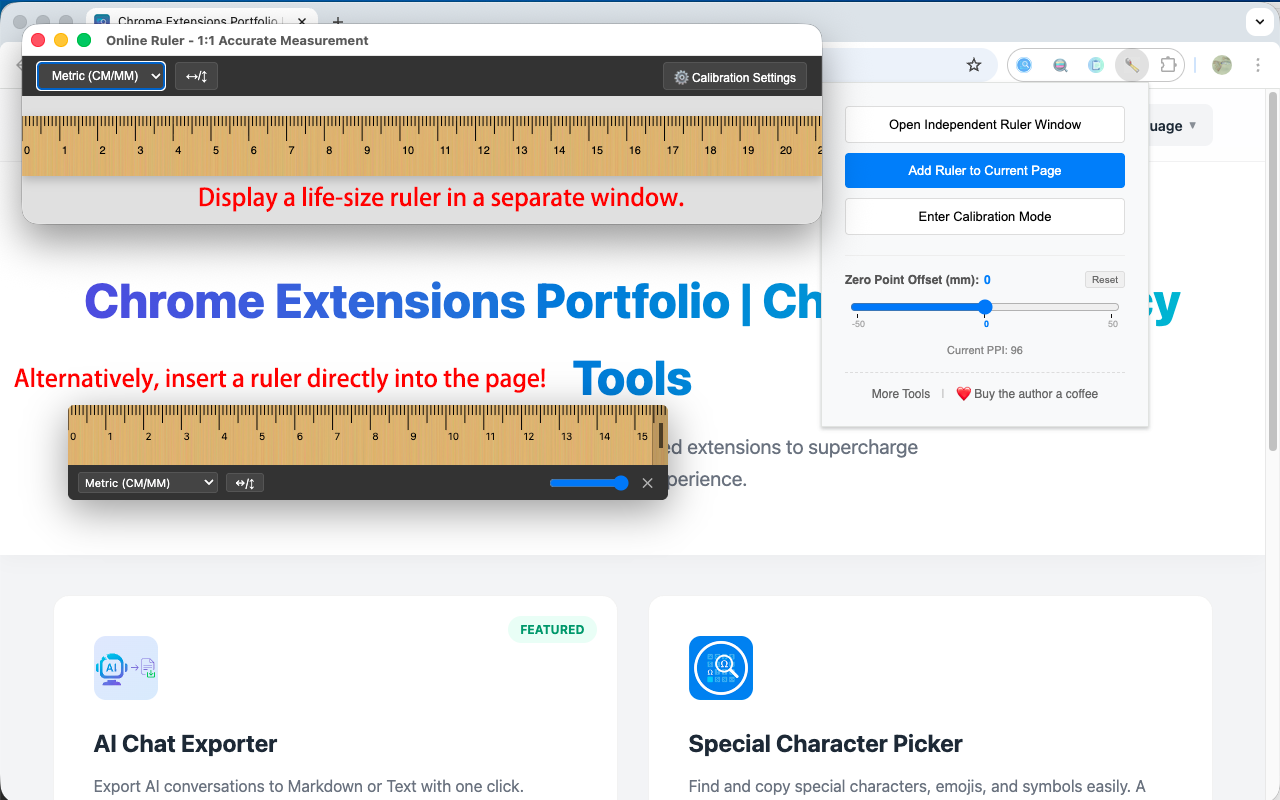
Standalone Window Mode: Opens a clean, "always-on-top" ruler window.
Page Overlay Mode: Displays floating rulers or protractors directly over any webpage with adjustable transparency.
Use the rotation handle to adjust the angle in real-time. Rulers and Standard Protractors support snapping to key angles (45°/90°).
Three-point Protractor arms also snap to 45° increments for easy alignment with webpage edges.
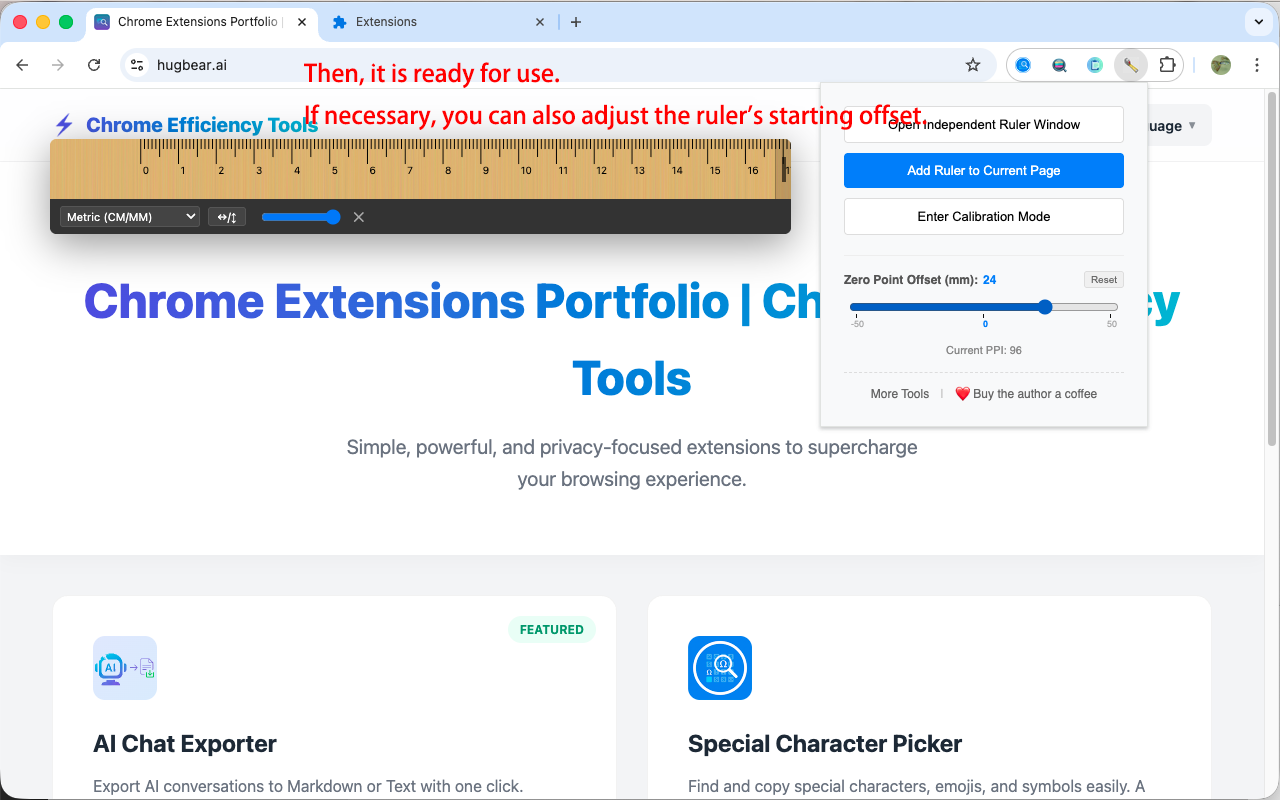
Mimics the protective "zero-point" edge and allows setting a custom starting offset. Includes a one-click "Reset" function.
Rulers support Wood, Plastic, or Metal textures with dynamic SVG filters. Protractors offer several semi-transparent color schemes (e.g., Classic Blue, Tech Green, Vital Orange) for clarity on any background.
The protractor and the three-point protractor support a variety of semi-transparent color schemes, ensuring clear visibility against different webpage backgrounds.
The three-point protractor supports individually adjusting the transparency of the fan-shaped area, so that the lines, endpoints and center points remain clear.
Metric: Centimeter (CM) and Millimeter (MM).
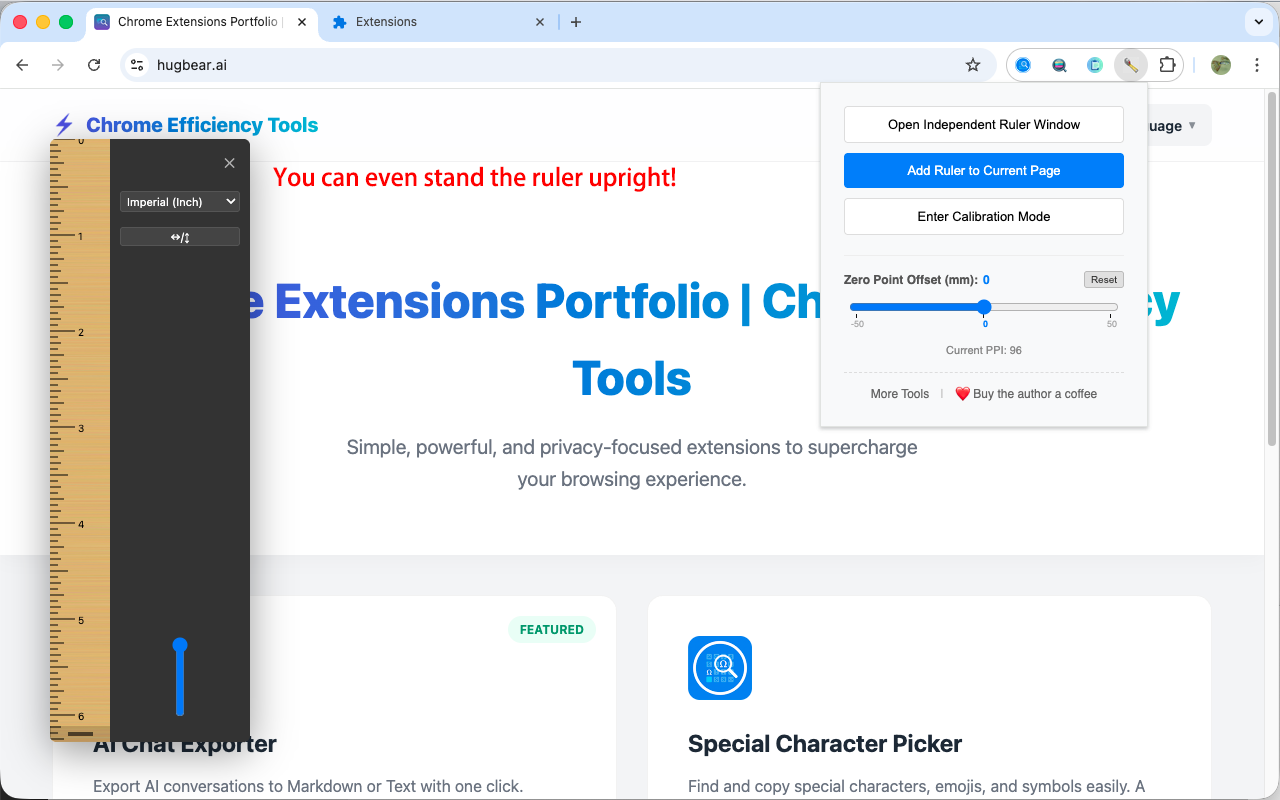
Imperial: Inch scales, high-precision down to 1/16 of an inch.
Full-Edge Resizing: Drag any point along the end of the ruler to adjust its length.
Precise Collaboration: Seamless integration of mouse dragging and keyboard arrow keys for pixel-level fine-tuning.
Real-time Synchronization: Changes to materials, colors, or settings are applied instantly.
All calibration data is stored exclusively within your local browser.
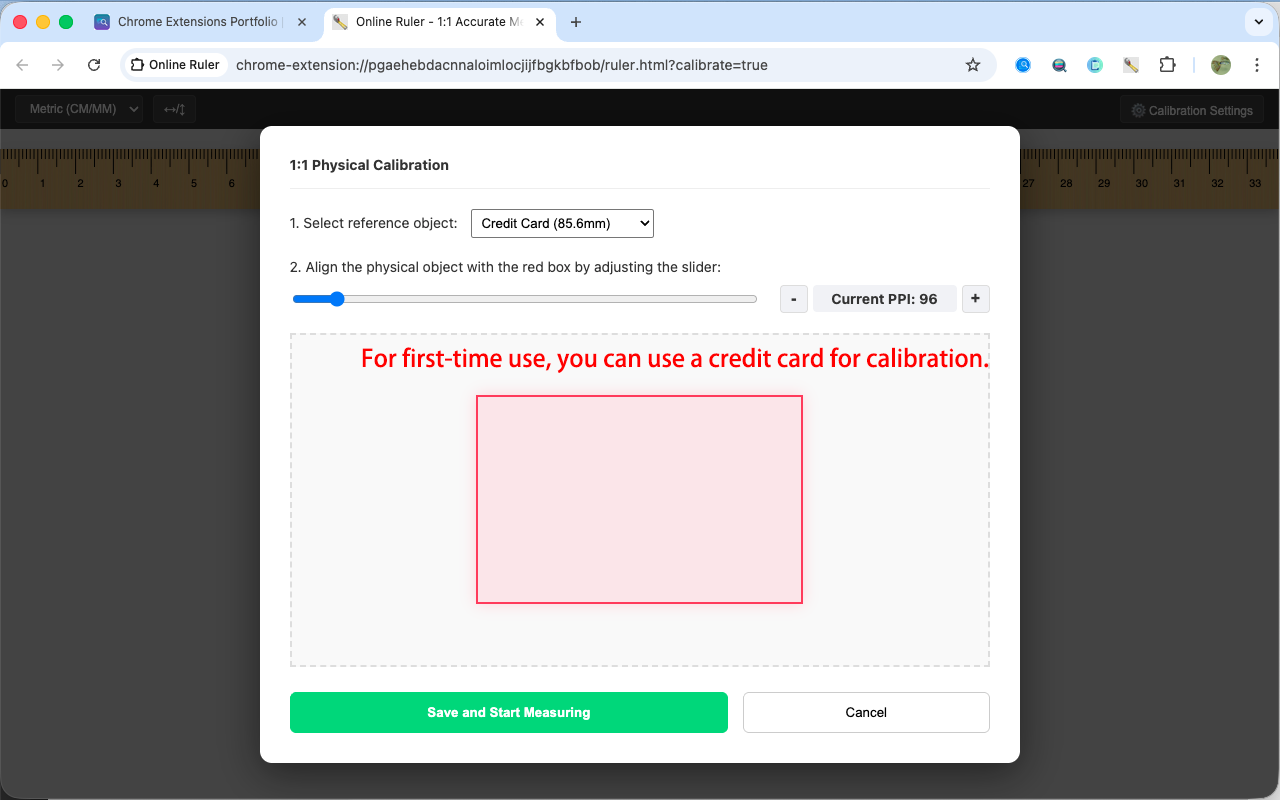
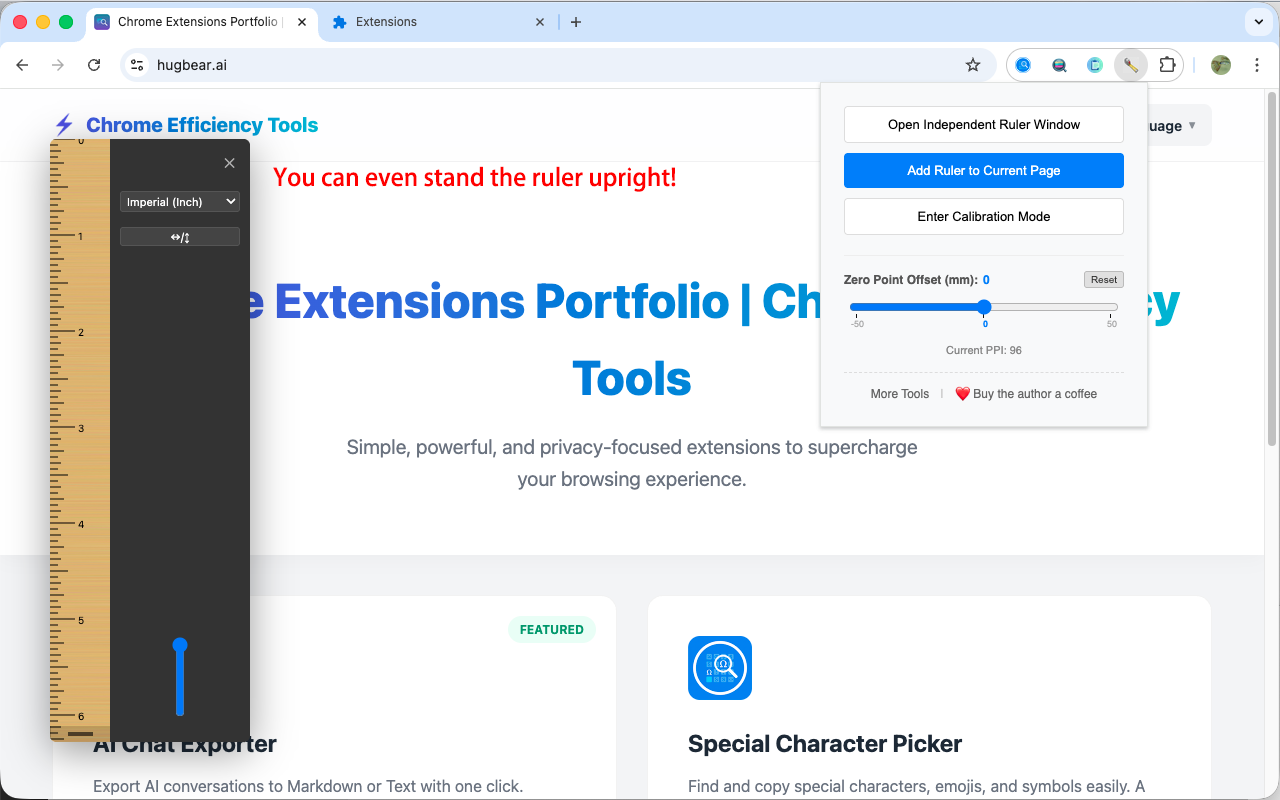
Click the extension icon and enter "Calibration Mode".
Select a reference (e.g., Credit Card) and adjust until the red box matches the physical object.
Click "Add Ruler" or "Add Protractor" to any page to start measuring.
Click the icons on the toolbar to quickly switch materials, colors, or adjust transparency.
Drag the main body to move, and drag the rotation handle at the end to adjust the angle.
Click the puzzle icon 🧩 in the top right of your browser, find "Online Ruler", and click the pin icon next to it to fix it to the toolbar. Then simply click the icon to open the ruler anytime.
Yes. Since different screens have different resolutions, normal images aren't accurate. This extension uses "Physical Calibration"—by aligning it once with a credit card or A4 paper, it remembers your screen's actual size for 1:1 precision.
Yes. The system supports multiple reference objects, such as A4 paper or coins. We will add more standards like A5 paper or common phone screen sizes in the future.
The "Independent Window" pops up a clean, resizable ruler window that you can drag anywhere and keep on top of other apps. "Page Overlay" injects the ruler directly onto your current webpage with transparency support, so it won't block your reading.
Yes! In version 2.0.0, we support multiple rulers and protractors at the same time. You can click "Add Ruler to Page" or "Add Protractor" multiple times, and each tool can be independently moved, rotated, resized, and customized (material/color) for comparative measurements and geometric positioning.
You can find material switching options in the toolbar at the end of the ruler or in the extension's Popup menu. We currently support Wood, Plastic, and Metal. When "Plastic" is selected, you can also switch between different color schemes.
You can use the "Zero Offset" feature. It simulates the protective end of a physical ruler, allowing you to set a starting gap (in mm) and reset it to zero with one click.
It's very simple. In overlay mode, you don't need to look for tiny corners; just drag anywhere along the ruler's edges to adjust its length.
Yes! Simply drag the rotation handle at the end of the ruler. It also supports precision snapping to 45°, 90° and 180° for quick adjustments.
Yes! In version 2.0.0, we've added the "Geometric Protractor" feature. You can insert a 1:1 accurate protractor by clicking "Add Protractor". It also supports 360° rotation, multiple color schemes, and physical calibration syncing based on your PPI data.
The all-in-one protractor supports PPI-based synchronous calibration, 360° arbitrary rotation, and multiple semi-transparent color schemes (Classic Blue, Tech Green, etc.), making it easy to use on any webpage background.
The 3-point dynamic protractor measures angles using one vertex and two endpoints. Unlike a standard protractor, it doesn't require aligning scales; instead, you directly drag the three control points to match elements on the page. It's especially suitable for measuring non-standard angles, design document edges, or geometric angles in images.
Yes. You can directly drag the two endpoints, and the measuring arms will extend infinitely, which is perfect for measuring large-span web elements, long diagonal lines, or complex geometric shapes.
Yes. The 3-point protractor supports independent transparency adjustment for the central sector area. This allows you to visually see the current measurement range without the sector obscuring the underlying webpage text or details.
No. Your calibration data (like PPI), unit preferences, and offsets are synced and saved in real-time. Settings apply instantly whether changed in the popup or across different pages.
Yes. This extension provides both Metric (CM, MM) and Imperial (Inch) scales, with high-precision imperial units divisible down to 1/16 inch.
No. All calibration data and preferences are saved locally in your browser. No data is ever uploaded to servers.
All materials (Wood, Plastic, Metal) use SVG technology to dynamically generate realistic visual effects. They are beautiful, clear, and very lightweight, so they won't slow down your browser at all.
🎉 v2.2.0 Update: Keyboard Controls and Pixel-Perfect Fine-Tuning for Web Rulers
This update enhances the precision and ease of use for web rulers. We’ve introduced a full suite of keyboard controls, enabling pixel-perfect alignment and efficient navigation between multiple rulers:
✨ Pixel-Perfect Keyboard Adjustments: Once a web ruler is in focus, use the arrow keys (↑ / ↓ / ← / →) to nudge it by 1 pixel. Hold the Shift key while using the arrow keys to move it in 10-pixel increments—perfect for both precise measurements and rapid positioning.
✨ Quick-Focus via Click: Simply click any ruler on the webpage to bring it into focus. You’ll see intuitive on-screen guidance, making it easy to start moving the ruler with your keyboard immediately.
✨ Seamless Switching with the Tab Key: If you have multiple rulers on the page, you can easily cycle the focus between them by pressing the Tab or Shift + Tab keys—streamlining the process of comparing measurements across different rulers.
✨ Intuitive Keyboard Guidance: Built-in prompts (e.g., "Arrow keys to move 1px," "Shift + Arrow keys to move 10px") and helpful tooltips ensure you can get started right away without needing to memorize complex shortcuts.
🎉 v2.1.0 UPDATE: THREE-POINT DYNAMIC PROTRACTOR IS LIVE!
This update further enhances on-page angle measurement capabilities with the new Three-Point Dynamic Protractor:
✨ Three-Point Dynamic Protractor: Add a tool consisting of a vertex and two endpoints to quickly align with any angle.
✨ Real-time Angle Calculation: Automatically calculates and displays the angle between the two arms in degrees (°) as you drag endpoints.
✨ Dynamic Extension Arms: The two measurement arms can be extended continuously to fit larger elements or design lines.
✨ Semi-transparent Sector Area: Visually see the current measurement range with a semi-transparent sector, with adjustable opacity.
✨ Independent Arm Snapping: Each arm snaps to 45° increments (0°, 45°, 90°, etc.) for rapid alignment with common directions.
✨ Precision Alignment: Supports multiple colors and features a transparent hollow circle at the vertex for pinpoint accuracy.
🎉 v2.0.0 MAJOR UPDATE: ALL-IN-ONE GEOMETRIC PROTRACTOR IS LIVE!
This update marks the transition from a single measuring tool to a comprehensive geometric toolbox:
✨ New Protractor Feature: You can now add protractors to any webpage in addition to rulers.
✨ 360° Arbitrary Rotation: Supports 360° rotation via a handle for precise measurement of slopes and angles.
✨ Multiple Color Styles: Offers various semi-transparent color schemes (Classic Blue, Tech Green, Vibrant Orange, etc.) for high visibility.
✨ Synced Physical Calibration: The protractor is rendered based on your PPI data, ensuring accurate real-world dimensions.
MULTI-RULER SUPPORT & RICH MATERIALS
This update brings more powerful multi-dimensional measurement capabilities and personalized visual choices:
✨ Multi-Ruler Support: Add multiple rulers to the same page to meet complex comparative measurement needs.
✨ New Plastic & Metal Materials:
- Plastic Material: Offers multiple fresh colors to make the interface more lively.
- Metal Material: Realistic brushed metal texture, professional and high-tech feel.
✨ Material Color Customization: Plastic material now supports multiple color schemes to adapt to different web backgrounds and personal preferences.
360° ARBITRARY ROTATION
Break free from the constraints of horizontal and vertical measurements. You can now rotate your ruler to any angle to match any object on your screen:
✨ Smooth Rotation Handle: Simply drag the new rotation handle at the end of the ruler (in Overlay Mode) to adjust its angle with fluid, real-time feedback.
✨ Precision Snapping: Effortlessly lock onto key angles like 45°, 90°, and 180° with built-in snapping logic and one-click presets for rapid switching.
✨ Visual Angle Badge: A dynamic tooltip displays your exact rotation degree in real-time, ensuring professional-grade measurement precision.
✨ Full Consistency: The realistic wood grain, scale markings, and interactive toolbar all maintain their structural integrity and clarity at any orientation.
Initial release.
This extension is open source and the code is available on GitHub. Contributions are welcome!
View Source Code on GitHub